
티스토리 뷰
728x90
반응형
VFX 파티클 시스템 구현 완료
목표 1: 용천수 영향권 시각화
파티클이 용천수 근처를 지날 때 색상 변화
준비물
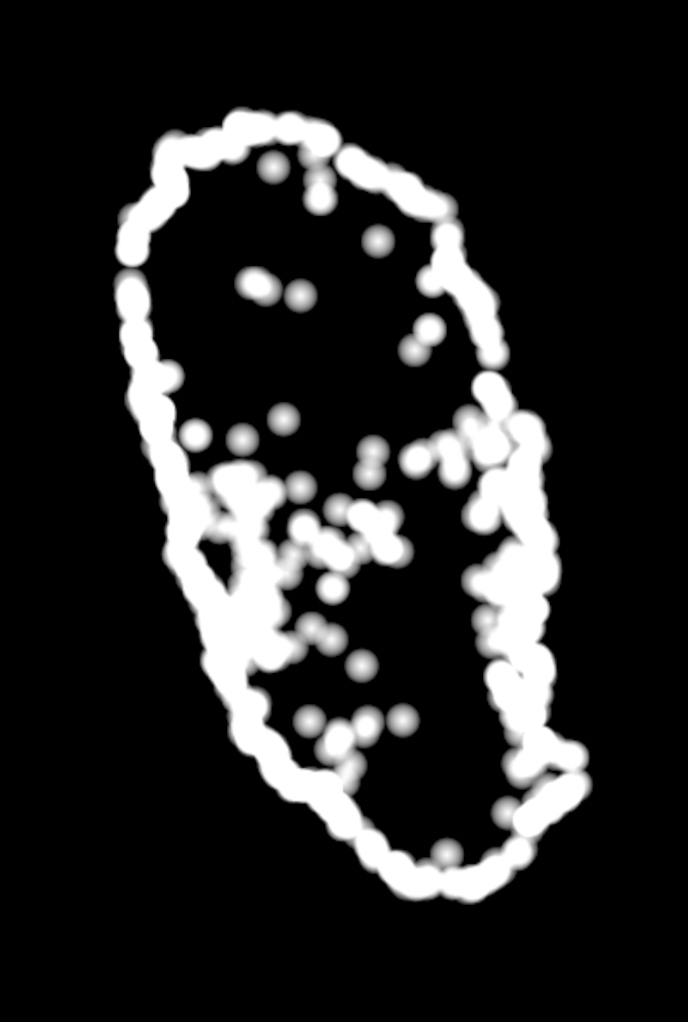
- spring_distance.exr (Houdini 1025개 용천수 distance field)
- 해상도: 원본 비율 유지
- 값 범위: 0~20m
Unity 설정
SM_VictimPathVFX.cs:
// Spring map 파라미터
Vector3 springCenter = new Vector3(-2278, -4058.18091f, -2890)
                     + new Vector3(-2644, -1356.30273f, 13395);
vfxGraph.SetVector3("MapCenter", springCenter);
vfxGraph.SetVector2("MapSize", new Vector2(43200, 58320));
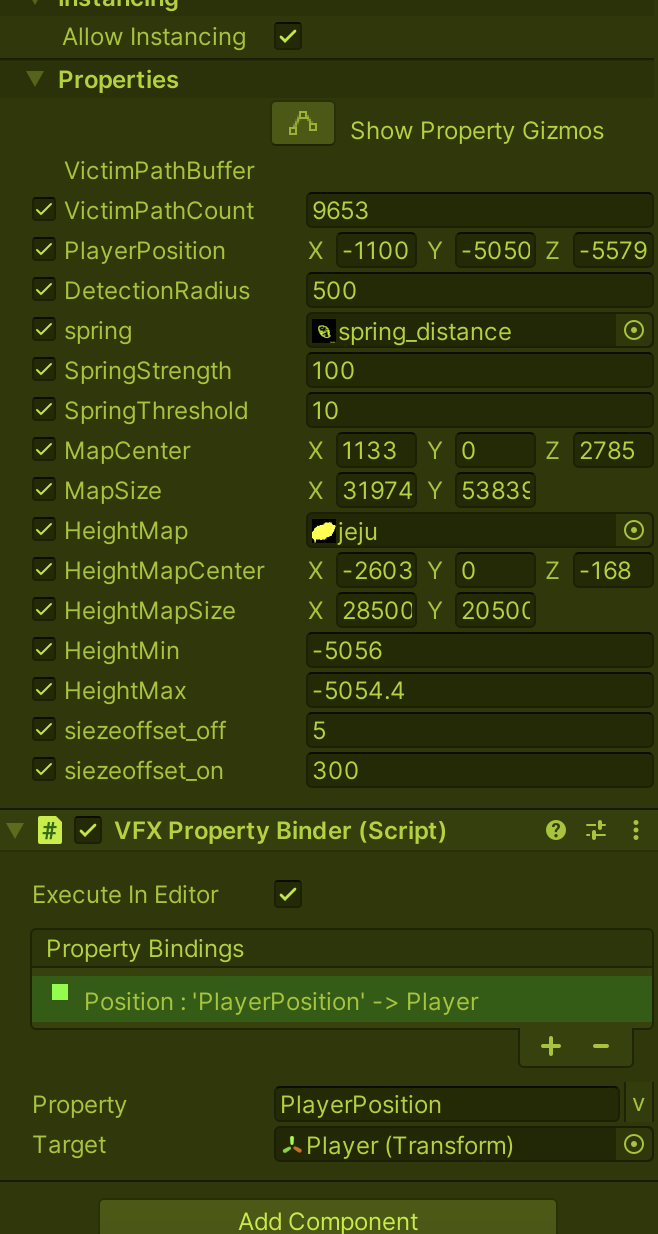
VFX Graph - Blackboard
SpringDistanceMap (Texture2D)
MapCenter (Vector3)
MapSize (Vector2)
SpringThreshold (float) = 20.0
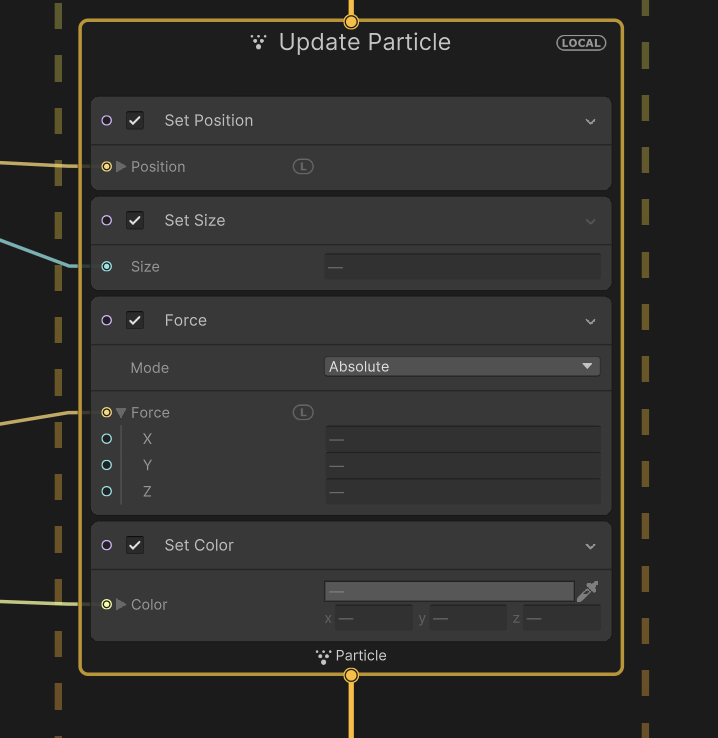
VFX Graph - Update Particle
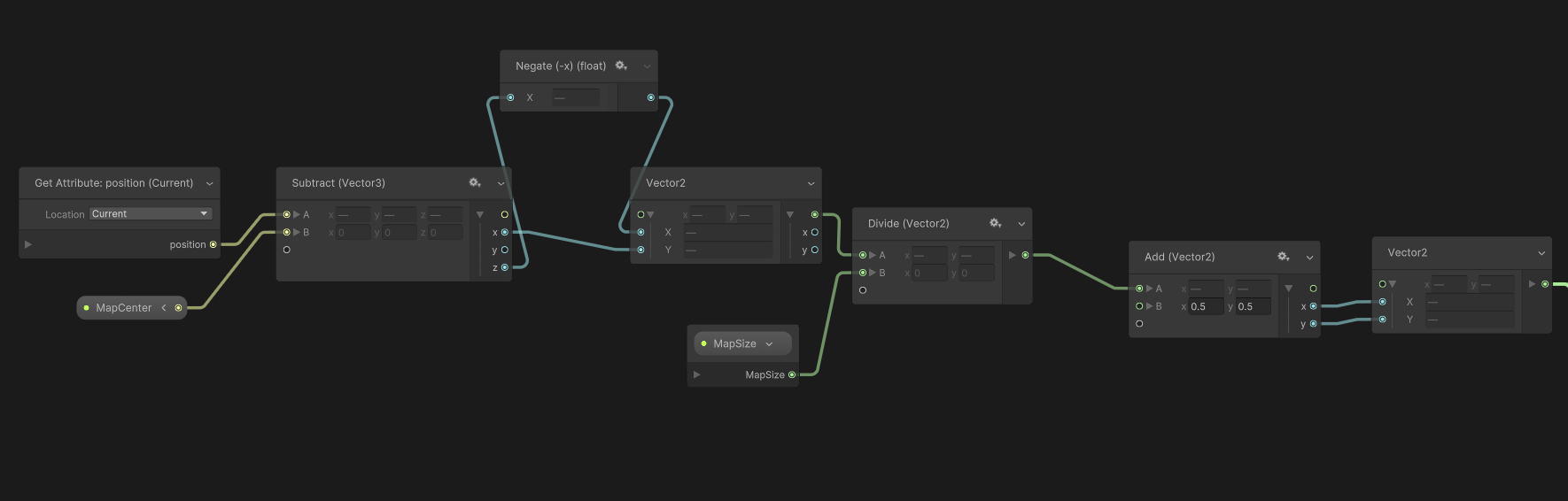
1. UV 계산:
   Get Attribute: position → currentPos
   Subtract: currentPos - MapCenter → localPos
   Swizzle.xz: localPos → localPos2D (Vector2)
   Divide: localPos2D / MapSize → normalized
   Add: normalized + (0.5, 0.5) → springUV

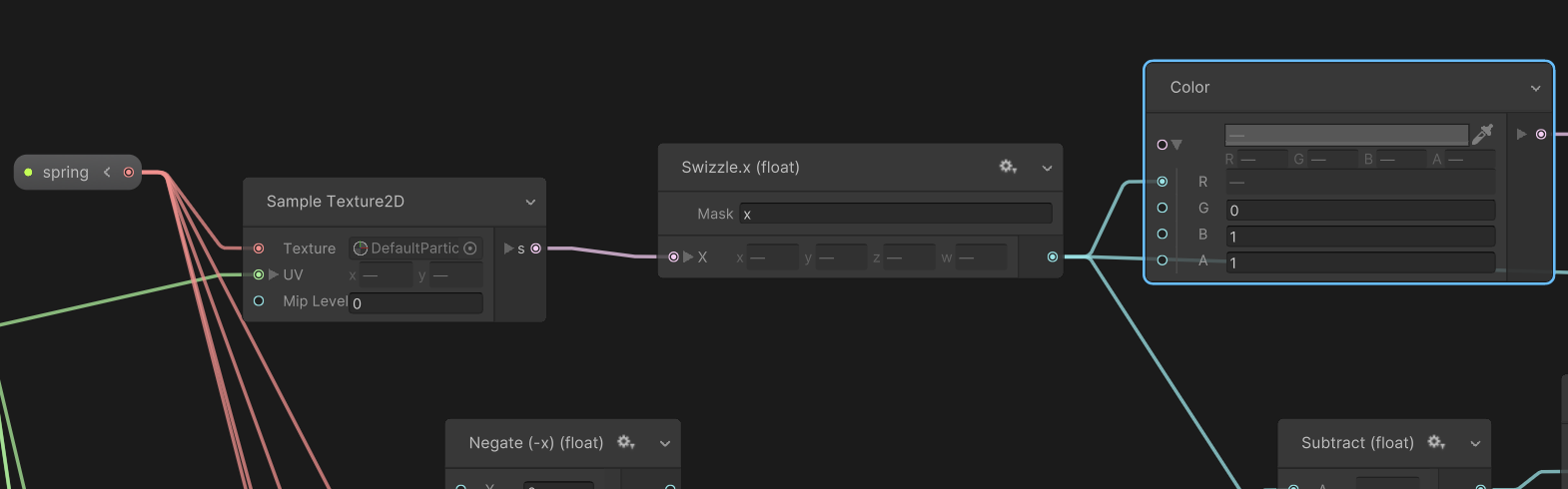
2. Distance 샘플링:
   Sample Texture2D(SpringDistanceMap, springUV) → s
   Swizzle.x: s → distance

3. 색상 적용:
   Compare: distance < SpringThreshold → isNear
   Branch:
   ├─ True: (1, 0, 0, 1) ← 빨강
   └─ False: (0, 0, 0, 1) ← 검정
   → color

   Set Attribute: color
결과: 파티클이 용천수 20m 반경 지나갈 때만 빨간색 표시
목표 2: 지형 높이 따라가기
파티클이 제주도 지형을 따라 이동
준비물
- jeju_height.tif (국토정보플랫폼 DEM)
- 해상도: QGIS 처리
- 높이 범위: 0~58m
Unity 임포트 설정
Texture Type: Default
sRGB: OFF
Compression: None
Format: R16
Wrap Mode: Clamp
Unity 설정
SM_VictimPathVFX.cs:
// Height map 파라미터
Vector3 heightCenter = new Vector3(-2278, -4058.18091f, -2890)
                     + new Vector3(-9668, 0, 694);
vfxGraph.SetVector3("HeightMapCenter", heightCenter);
vfxGraph.SetVector2("HeightMapSize", new Vector2(28511.48f, 20509.97f));
vfxGraph.SetFloat("HeightMin", 0f);
vfxGraph.SetFloat("HeightMax", 58f);
VFX Graph - Blackboard
HeightMap (Texture2D)
HeightMapCenter (Vector3)
HeightMapSize (Vector2)
HeightMapRotation (float) = 180
HeightMin (float) = 0
HeightMax (float) = 58
HeightOffset (float) = 10
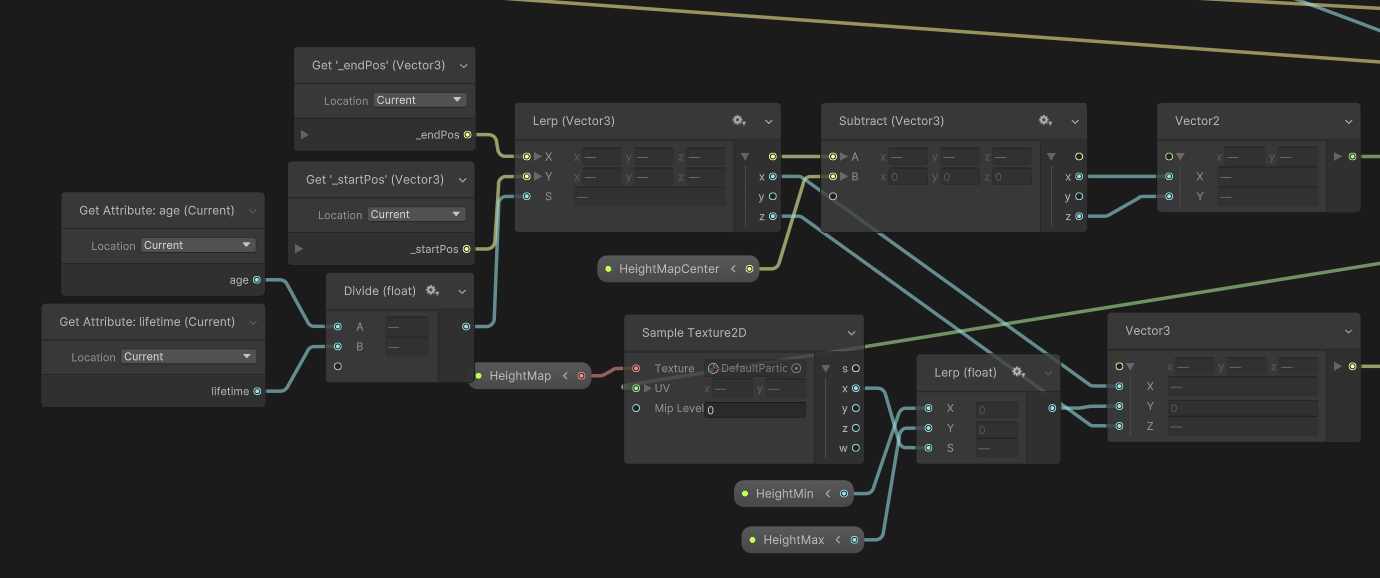
VFX Graph - Update Particle
1. 기본 경로 계산:
   age / lifetime → t
   Lerp(StartPosition, EndPosition, t) → pathPos

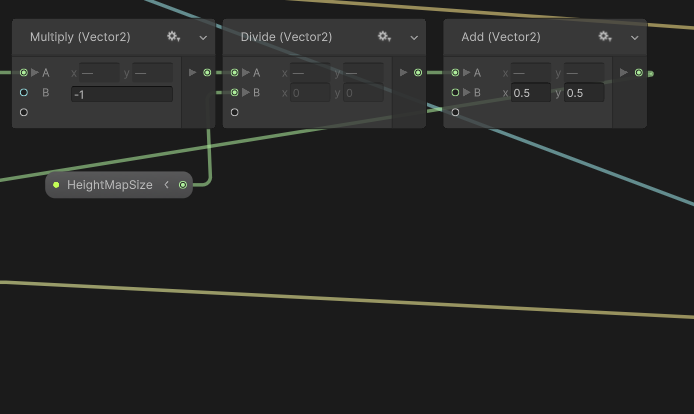
2. HeightMap UV 계산 (180도 회전):
   pathPos - HeightMapCenter → localPos
   Compose Vector2(-localPos.x, -localPos.z) → rotated
   rotated / HeightMapSize → normalized
   normalized + (0.5, 0.5) → heightUV

3. 지형 높이 샘플링:
   Sample Texture2D(HeightMap, heightUV) → heightSample
   Swizzle.x: heightSample → normalizedHeight
   Lerp(HeightMin, HeightMax, normalizedHeight) → terrainHeight
   Add: terrainHeight + HeightOffset → finalHeight

4. 최종 위치:
   Compose Vector3(pathPos.x, finalHeight, pathPos.z) → finalPos
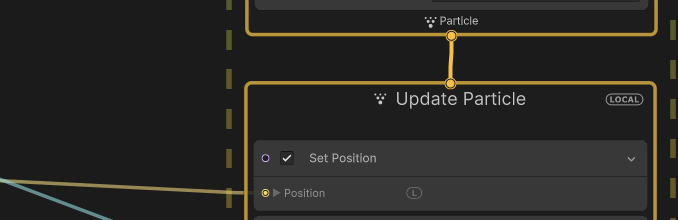
   Set Position: finalPos
결과: 파티클이 XZ 경로는 유지하면서 Y값만 지형 높이를 따라감
핵심 포인트
좌표 변환 주의사항
- Spring map: -90도 회전 = Swizzle(x, z)
- Height map: 180도 회전 = (-x, -z)
- Y 제거: Vector3 → Vector2 변환 시 Swizzle.xz
UV 계산 공식
1. Position - Center → localPos
2. 회전 적용 → rotated
3. / Size → normalized (월드 좌표 → 0~1)
4. + 0.5 → UV (중심 맞추기)
파티클 생성 방식
Periodic Burst:
- Count: VictimPathCount (9653)
- Delay: 2초
- Loop: Infinite
- Capacity: VictimPathCount × 5
완성! 🎉
1 height map (0-1범위)

2.용천수 , 스칼라 맵 set color
728x90
반응형
'Unity > VFX Graph' 카테고리의 다른 글
| Unity_ OpticalFlow keijiro (5) | 2025.08.08 |
|---|---|
| Unity_import pointcloud _keijiro_texture2D (0) | 2023.06.11 |
| unkity2021_ vfx Graph_ fbx motion (skined mesh) (0) | 2022.10.26 |
| unity VFX graph asset (0) | 2022.10.14 |
| Unity VFX Graph : 3d obj -> 2D texture map(position, color)/ SDF? (0) | 2022.10.14 |
250x250
공지사항
최근에 올라온 글
최근에 달린 댓글
- Total
- Today
- Yesterday
링크
TAG
- Midjourney
- Arduino
- 라즈베리파이
- colab
- opencv
- houdini
- Express
- AI
- 유니티
- VFXgraph
- docker
- sequelize
- VR
- CNC
- RNN
- Python
- krea
- DeepLeaning
- TouchDesigner
- three.js
- ai film
- opticalflow
- node.js
- Java
- Unity
- MQTT
- 4dgs
- MCP
- 후디니
- 4d guassian splatting
| 일 | 월 | 화 | 수 | 목 | 금 | 토 |
|---|---|---|---|---|---|---|
| 1 | 2 | 3 | 4 | 5 | 6 | 7 |
| 8 | 9 | 10 | 11 | 12 | 13 | 14 |
| 15 | 16 | 17 | 18 | 19 | 20 | 21 |
| 22 | 23 | 24 | 25 | 26 | 27 | 28 |
글 보관함
반응형